The most expensive step in any mobile funnel is the install. Someone has to open the store, wait for the download, give up storage and create an account. Most people never finish. A Telegram Mini App removes that step entirely: the customer taps a button in a chat and lands straight in your catalogue.
A quick word on naming, because it confuses people. Telegram Mini App, Telegram Web App and "mini app in Telegram" all mean the same thing. The official documentation says Mini App; Web App is a leftover from early API versions and still shows up in older articles.
What a Telegram Mini App actually is
A Telegram Mini App is a web page that Telegram opens in its own window on top of the chat. Nothing exotic under the hood: an ordinary front end built with HTML, CSS and JavaScript, hosted on your server. Telegram displays it and hands it a JavaScript API: who opened it, which colour theme they use, buttons, payments, camera, location.
From the customer's side it looks like this. You tap a button in a bot, and a second later there is an app in front of you: images, filters, a cart, a pay button. Nothing downloads from a store, nothing eats storage, nothing asks for permissions.
For a business there are two real wins here. The first one we just named: no install barrier. The second matters more than it sounds — the customer is already authenticated. You know who they are before they tap anything, and you never push them through a sign-up form that loses half of them. Then there is reach: over a billion monthly active users, per Pavel Durov's statement from March 2025, around 500 million of whom open the app daily.
Mini App or bot: the actual difference
A bot talks in messages. A Mini App shows a screen. A bot runs a dialogue one turn at a time: question, answer, next question. A Mini App lays everything out at once, like a normal page: twenty products in a list, filters, a price slider, a cart that recalculates as you go.
The rule for choosing between them comes down to how long the scenario is. Fewer than seven steps and no choice from a long list? Take the bot. A callback request, a booking, an order status, a broadcast: a bot does all of this better, because there is no point loading a separate interface for three questions.
A Mini App starts to make sense where the customer has to compare or configure something. A catalogue of a hundred items. A calculator where five parameters drive the price. An account area with order history. A booking flow where someone needs to see the whole calendar rather than poke at ten date buttons.
| Telegram bot | Telegram Mini App | |
|---|---|---|
| Interface | messages and buttons | a full page |
| Catalogue of 100+ items | painful | natural |
| Filters, sliders, maps | no | yes |
| Complex price calculation | one question at a time | all on one screen |
| Broadcasts and reminders | yes | only through a bot |
| Build time | 5–7 days | 2–3 weeks |
In practice, though, it is not either/or. Almost every working Mini App lives paired with a bot: the Mini App takes the order, the bot sends confirmations, reminders and statuses. The reason is simple. A Mini App cannot message a customer first. Not ever. Only a bot can.
Mini App, website and mobile app
| Website | Mobile app | Mini App | |
|---|---|---|---|
| Installation | none | App Store / Google Play | none |
| Who the visitor is | unknown | after sign-up | known immediately |
| Store commission | — | 15–30% | — |
| Push reminders | weak | yes | through a bot |
| Time to launch | from 2 weeks | from 2–3 months | from 2 weeks |
| Updates | instant | store review | instant |
A Mini App does not replace a website. A website captures search traffic; a Mini App captures none, because Google does not index it. What it does instead is something a website cannot: it recognises the person with no sign-up at all, and it lives where they already spend their day.
What a Telegram Mini App can do in 2026
Back in 2023 this really was "a page in a little window", and the scepticism around Mini Apps was fair. What broke that was Bot API 8.0 in November 2024, which Telegram itself called the largest update in the history of Mini Apps. Here is where things stand as of Bot API 10.1 (June 2026).
A Mini App can go full screen via requestFullscreen(), supports landscape orientation and can lock it. It can put its own icon on the phone's home screen with addToHomeScreen(), after which the customer launches you like a regular app, minus the store and minus the install. It can authenticate by fingerprint or face, keeping the token in the iOS Keychain and the Android Keystore.
Data can be stored on Telegram's side: CloudStorage holds up to 1024 entries per user and syncs them across that user's devices, DeviceStorage gives 5 MB locally, SecureStorage holds 10 encrypted values. Payments live inside: Telegram Stars for digital goods and subscriptions, external providers with Google Pay and Apple Pay for everything else. Smaller but useful pieces include location with accuracy, accelerometer, gyroscope, device orientation, a QR scanner, clipboard reading and haptic feedback.
You will never need half of that list. Three things genuinely move money. The home screen icon turns a one-off customer into a returning one. In-app payment stops the funnel from breaking at the jump to a third-party checkout. And CloudStorage saves the cart when someone starts an order on the train and finishes it on a laptop that evening.
What this looks like in production: three of our projects
ZUBR TAXI — a moving calculator in six steps
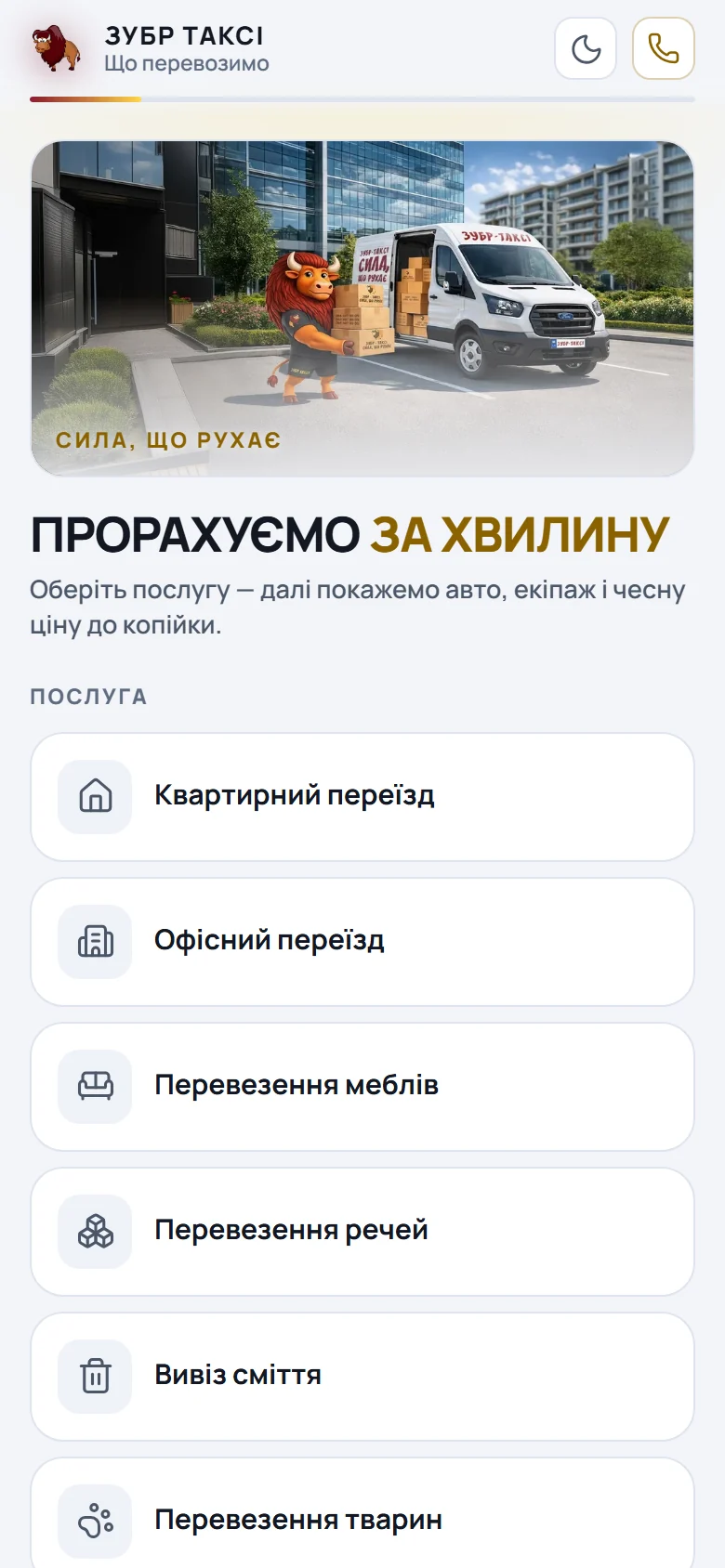
A cargo taxi service in Kyiv. The brief was not "make it pretty" but "get the dispatcher out of the first touch". Someone who is moving house wants one number: what will this cost. And they want it before the call, not after ten minutes of questions on the phone.
The Mini App walks them through six screens: service, volume, vehicle and tariff, route, contacts, confirmation. Volume is picked from ready-made presets such as "2 rooms — 14 m³", and the system highlights the vehicles that will actually fit it. A running total sits at the bottom the whole time and updates instantly, so by the contacts step the customer already sees their ₴4,100 with floors, lift, kilometres outside the city and the number of movers included.
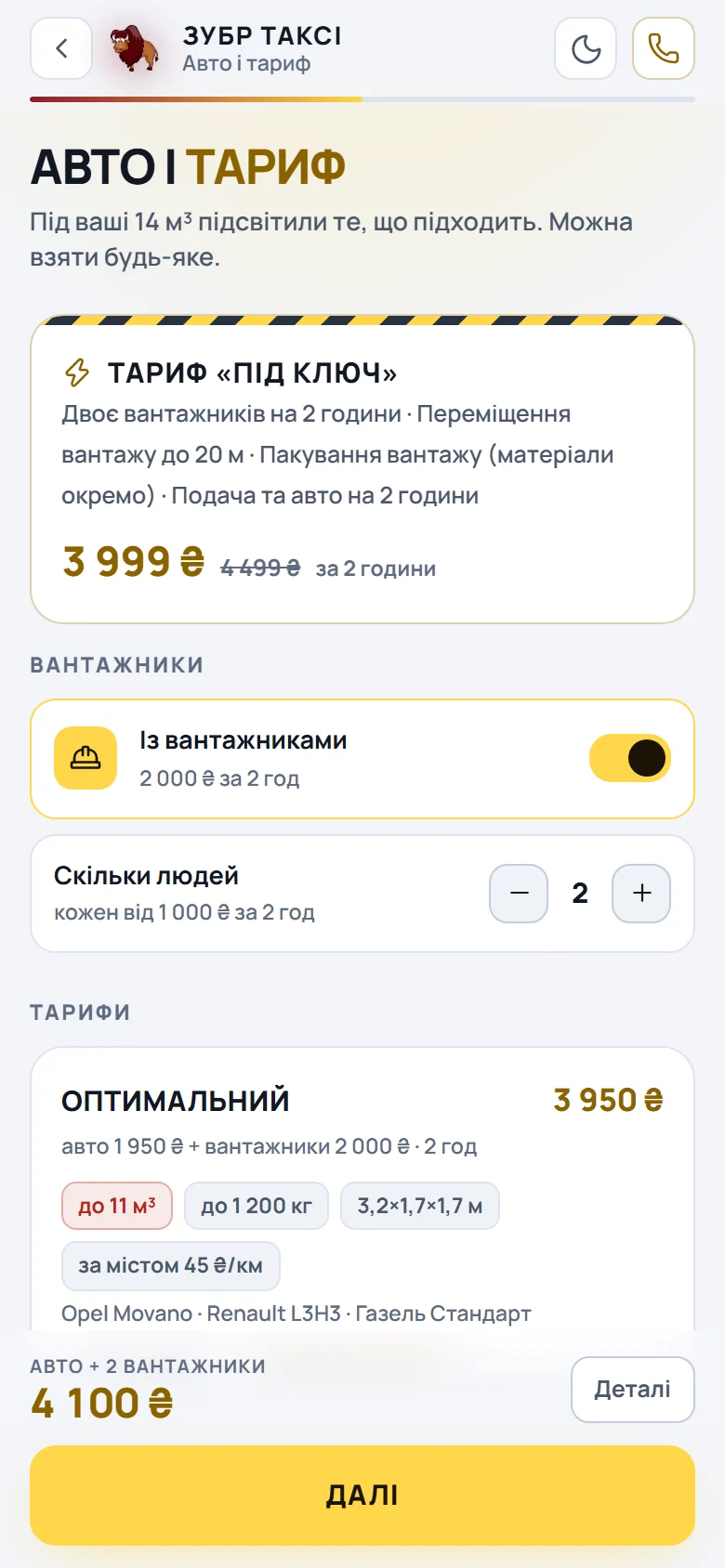
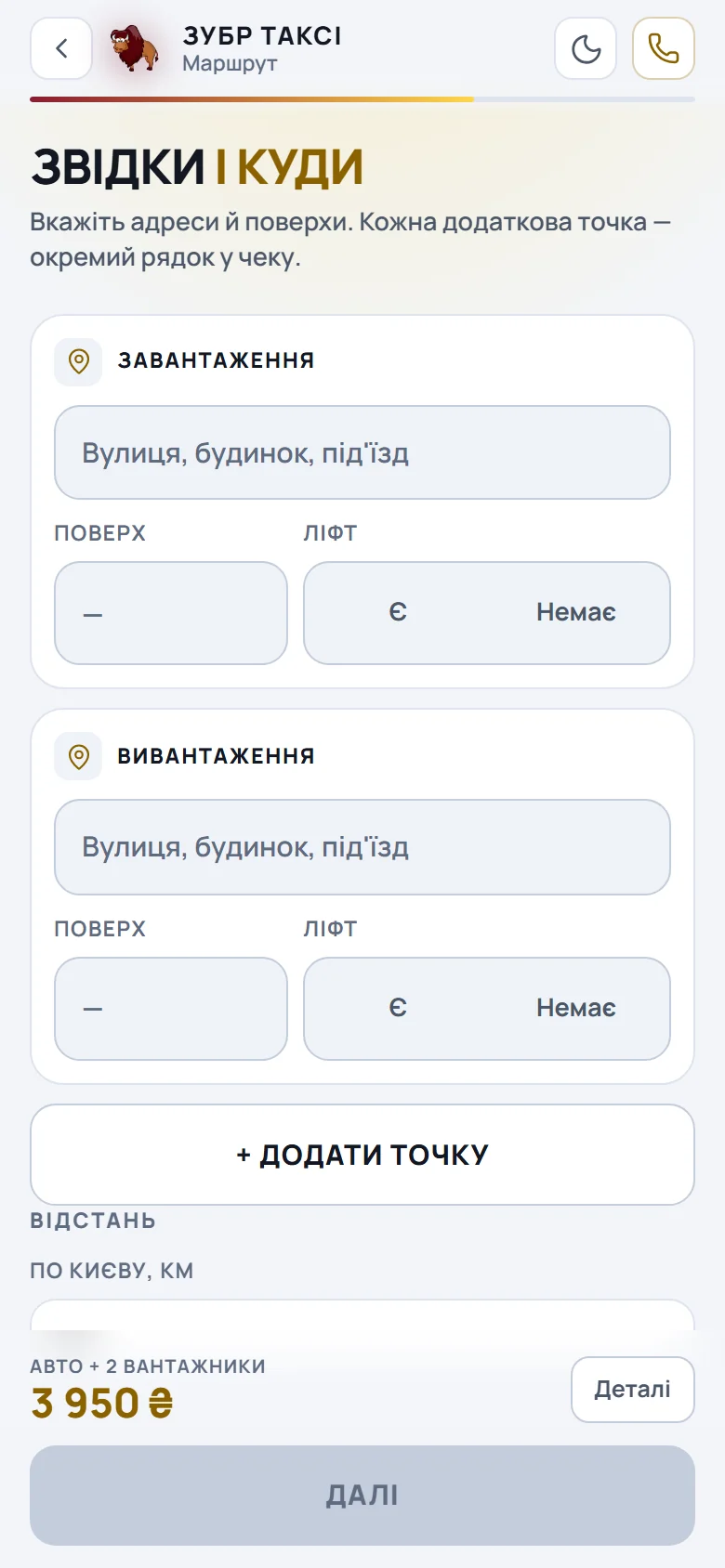
Under the hood: PHP 8.3 and SQLite with zero dependencies. No framework, no npm. That is not minimalism for its own sake — every price, vehicle and tariff lives in a single catalog.json, so raising the per-kilometre rate needs neither a developer nor a logic deploy. A bot on the same codebase carries the order from "new" to "done" and gives the admin a dispatch panel.
Samokrutka — a tobacco shop with Nova Poshta delivery
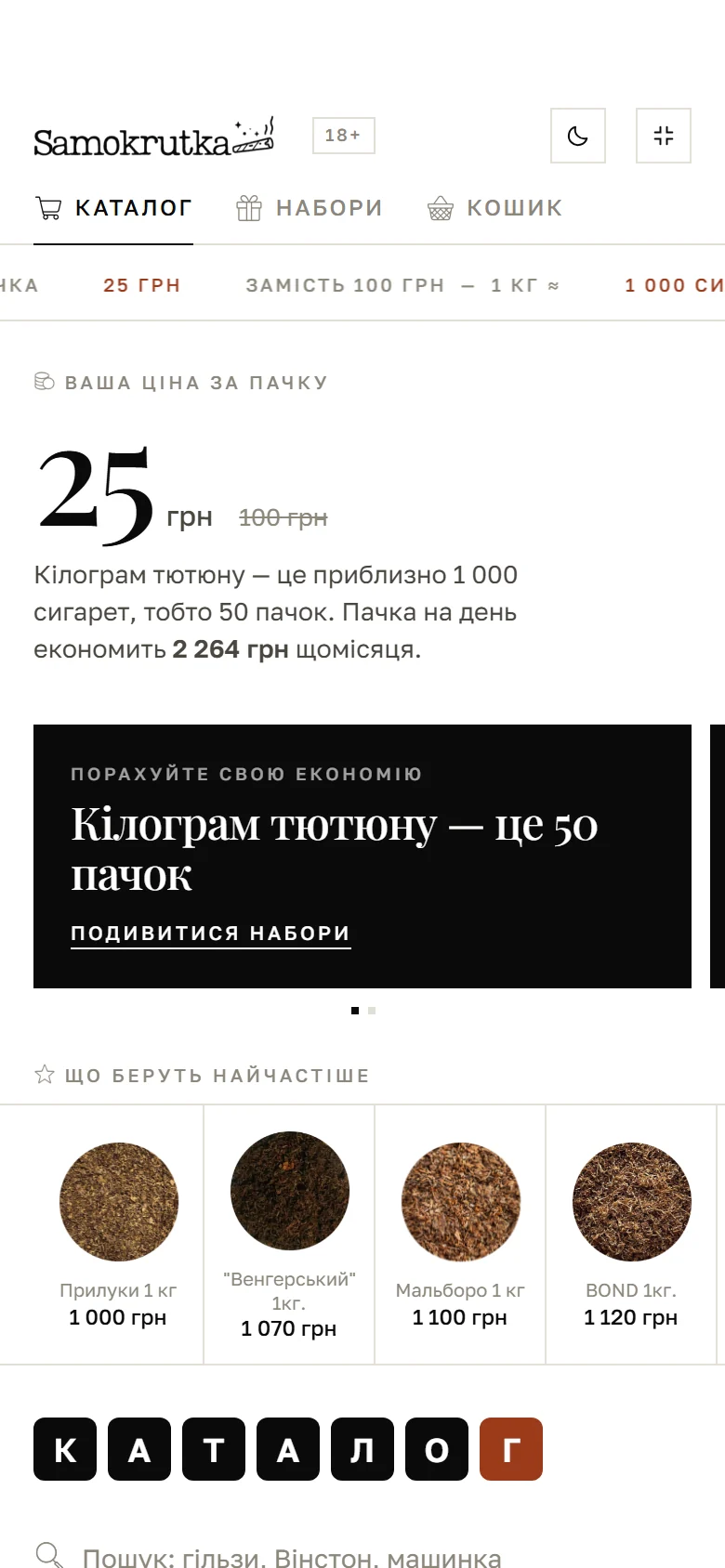
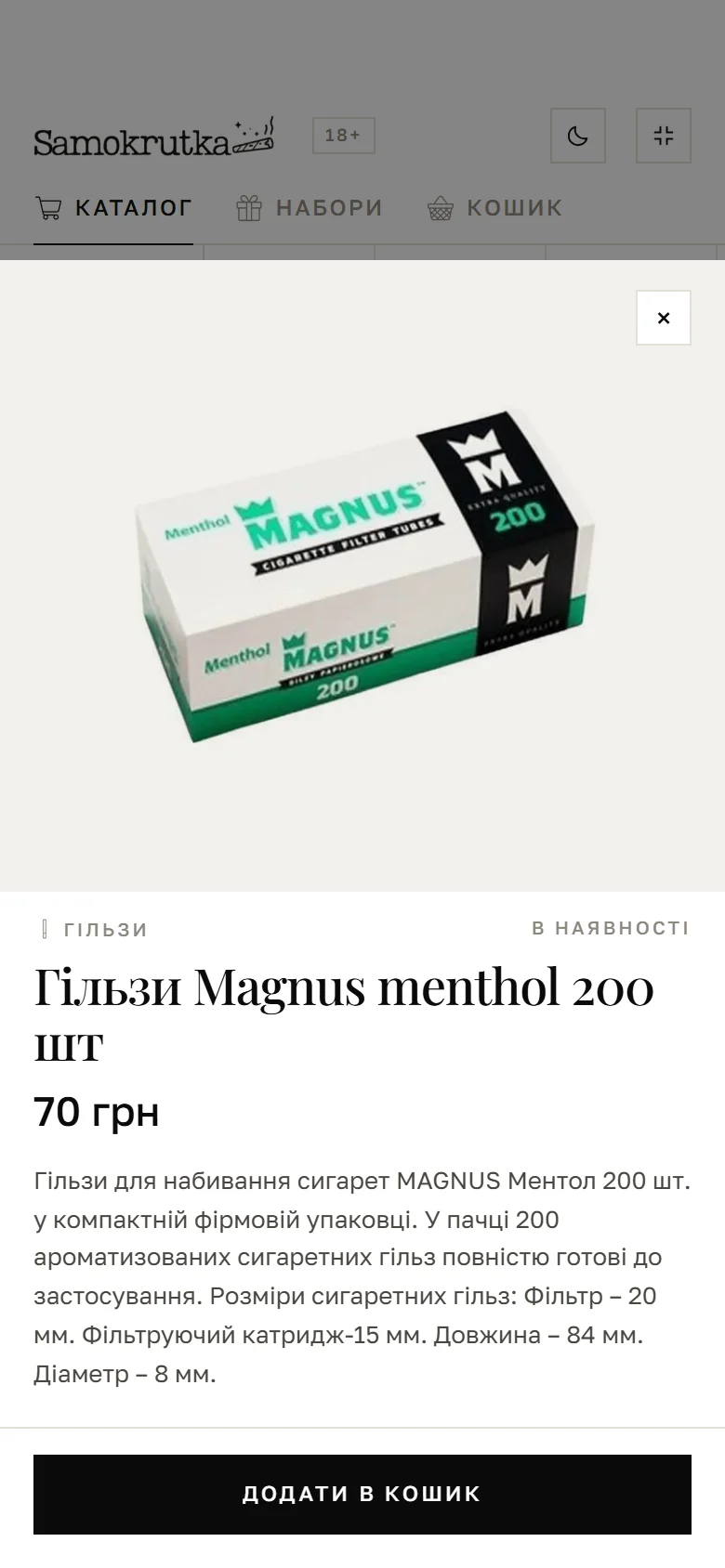
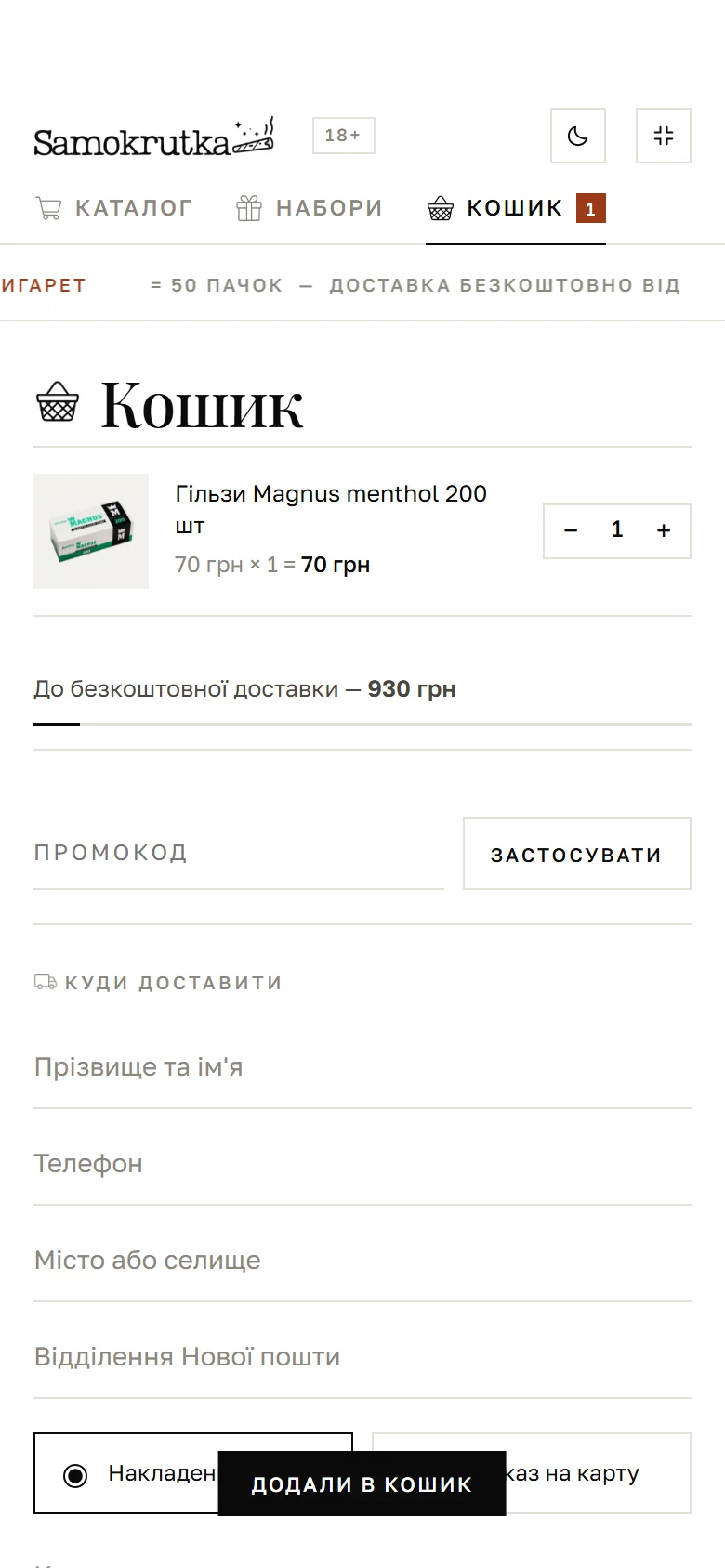
A different kind of job: not a calculator but a shop. Catalogue, bundles, in-stock filters, a price slider, search, dark and light themes. The product card opens in the same window with no navigation away, with a button pinned to the bottom of the screen.
The interesting part here is the cart. Promo code, progress towards free delivery, payment choice and, above all, picking the city and the Nova Poshta branch right inside the Mini App. The order is completed end to end without ever leaving Telegram, and that is precisely the step where shops usually hand the customer off to an external site and lose a share of the orders.
Wokbanda — sushi delivery across two cities
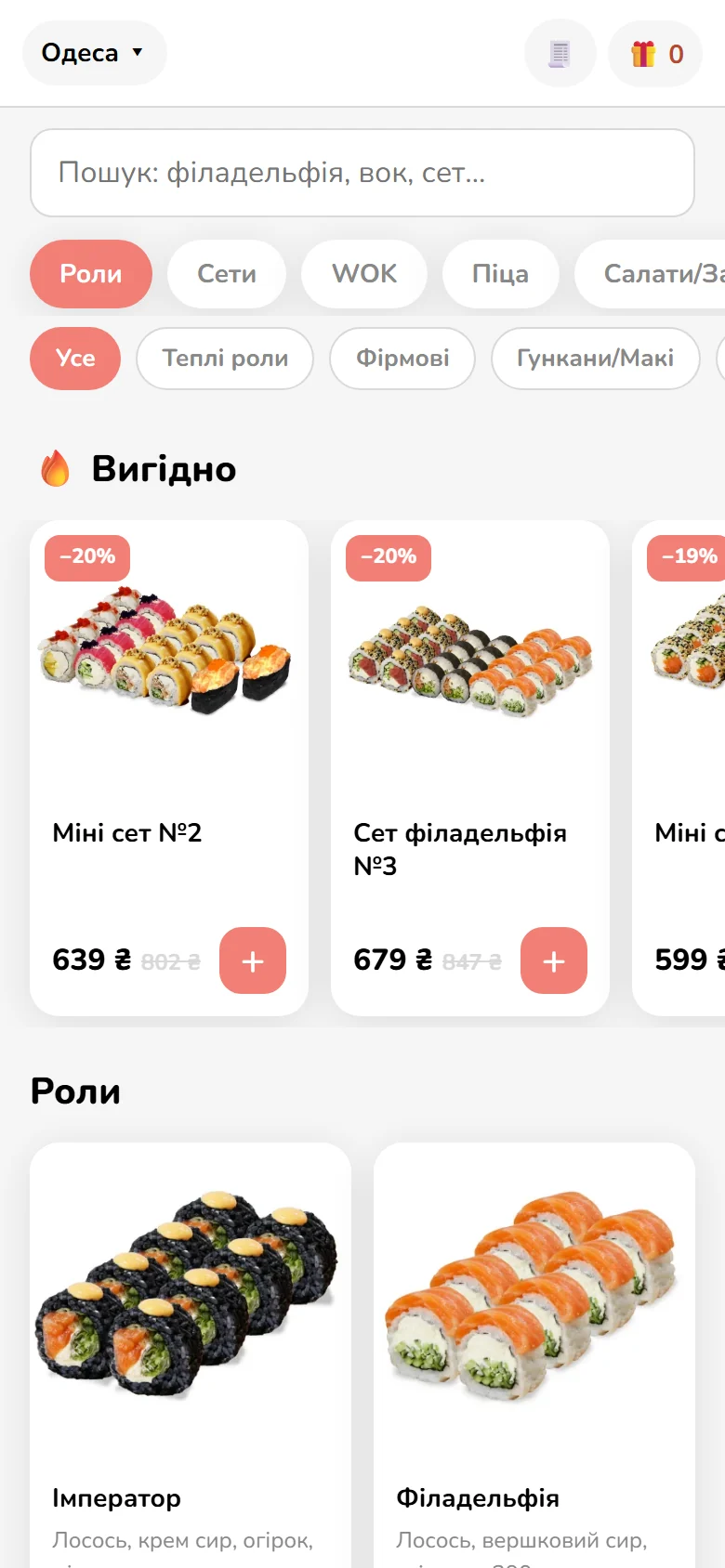
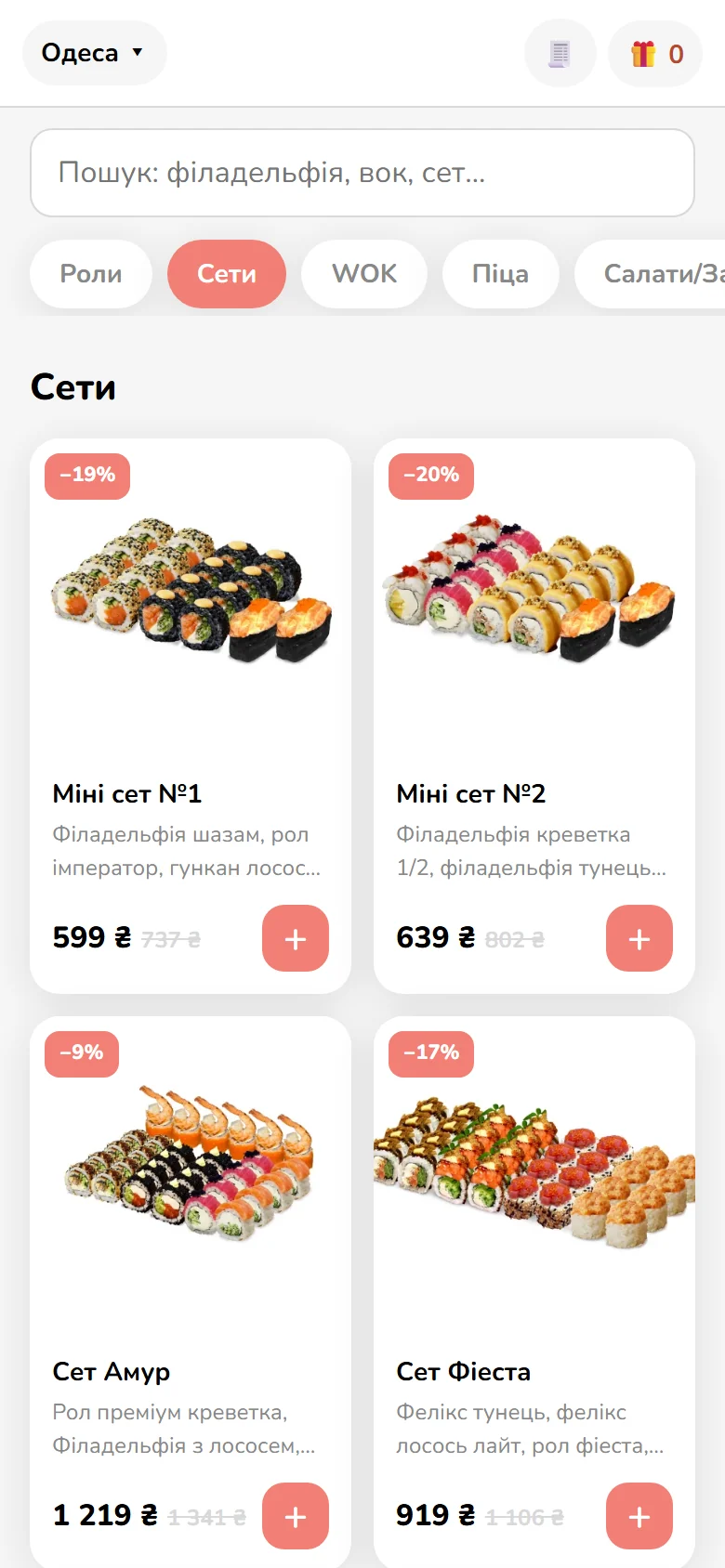
The third case is interesting for the work we did not have to do. The client already ran a shop that exposed its products through an open Store API: names, descriptions, prices, discounts, photos. The catalogue was never entered by hand; it is pulled from the shop and updates along with it. This is the cheapest of all scenarios, and it is exactly what the pricing section below refers to.
After that came the specifics of the niche. Odesa and Mykolaiv, each city with its own delivery zones, and those zone boundaries are drawn not in code but in Google My Maps, so the client can edit them without us. The Mini App pulls the zone maps and prices delivery by which zone the address falls into.
More of our work is in the case studies.
Four traps that break Mini Apps
This is the part marketing articles leave out. These four things are why projects get rebuilt, and they are exactly what to ask a developer about before you pay.
The server validates initData, not the page
A Mini App receives initData, a string carrying the user's details. It can be forged in a minute, so the front end must never be trusted with it. The server has to recompute the HMAC-SHA-256 signature using a key derived from the bot token, and check auth_date so an old request cannot be replayed. A developer who skipped this handed you a shop where anyone can order in someone else's name.
The Telegram WebApp API lies outside Telegram
This one caught us out. The window.Telegram.WebApp object exists in any browser, and both MainButton and requestContact work there quite happily. Which means checking "are we inside Telegram?" by testing for that object proves nothing: plain Chrome answers yes as well. The only reliable sign of a genuine client is a non-empty initData. That is all we look at now.
The server calculates the price
If the total is only computed in JavaScript, someone will rewrite it in the console in five seconds. In ZUBR the calculator exists as two mirrored copies: one on the front end so the number updates instantly, one on the server. Orders are accepted on the server figure only, and if the two disagree, the server wins.
Theme and safe areas
Telegram hands over its own palette and may switch to dark mid-session, and on an iPhone the notch eats part of the screen. A Mini App that ignores themeParams and safeAreaInset looks like a stranger inside its own messenger half of the time. A detail every customer notices and no tester on a single phone ever does.
How to build a Telegram Mini App: three routes
There are three routes, and the difference between them is not price. It is who owns the result.
A no-code builder will give you a working catalogue in an evening. As a way to test whether orders will come at all, that is a fair choice. The problems start precisely when the orders do come. The data sits with the service, the pricing logic is theirs, the design stops at the template, the monthly fee never stops, and taking your shop and its code to your own server is never going to happen. It is a rental, not an asset.
Building it yourself is realistic too. A Mini App is an ordinary front end, so anything works: React and Next.js, Vue, Svelte or plain JavaScript. Telegram attaches through a single telegram-web-app.js script, after which you work with the window.Telegram.WebApp object. The back end is equally open, from Node.js to Go. The difficulty is not in the front end, though. It is in validating initData, recalculating prices server-side and handling payments — the same three places we described above. That is where first attempts usually fall over.
Custom development earns its keep when the Mini App is a sales channel rather than an experiment: your own pricing rules, an integration with an inventory system or CRM, payments, and an admin panel a manager can run without a developer.
A note on "no programming required". You can technically build a Mini App with no back end at all, as long as it stores nothing. A calculator that computes a figure and drops it into the chat needs no server. The moment orders, a cart or stock levels appear, a server becomes mandatory: there is nowhere to keep the data and nobody to verify it.
And the advice we give almost everyone: do not start with the catalogue. Start with the single screen that answers the customer's most expensive question — what does this cost. At ZUBR that screen ended up being the entire Mini App. The shop was never needed.
What a Telegram Mini App costs
The price is set not by the number of screens but by how much logic and integration sits underneath them. Our benchmarks:
| Format | Price | Timeline |
|---|---|---|
| Telegram bot for lead capture | from $180 | 5–7 days |
| Telegram Mini App | from $490 | 2–3 weeks |
| Shop in Telegram (catalogue, cart, payments, CRM) | from $720 | 3–4 weeks |
The $490 Mini App covers a custom interface inside Telegram, a catalogue or forms, an account area, a back end with data storage, in-Telegram payments, responsive layout and analytics.
Projects get more expensive through integration with someone else's inventory system or CRM, non-standard payment flows, and complex pricing such as delivery zones or hourly rates. They get cheaper through exactly one thing: a catalogue that already exists in machine-readable form and can be pulled rather than typed in. That is what happened at Wokbanda, because the shop exposed its products through an open Store API.
We produce exact figures after a brief and return them within 24 hours, free of charge. Packages and details are on the Telegram bot development page.
When you do not need a Mini App
An honest list, so you do not spend $490 for nothing.
A three-step scenario needs no interface. "Name, phone, request" lives perfectly well in a bot: five days and three times cheaper.
You need search traffic. A Mini App is not indexed at all, so if the goal is being found on Google, start with a website. A Mini App is at best an addition to it.
Your audience is not on Telegram. If customers write to you on Viber or simply call, test the idea with a landing page plus a bot-and-spreadsheet setup rather than full development.
The catalogue is locked inside an accounting system nobody will open up. A shop without live stock and prices breaks in week two. Data access first, interface second.
Several thousand SKUs with faceted search. That is a full e-commerce platform, and a Mini App would be a crutch.
Where to start
The order of operations that saves money:
- Write out the customer's scenario step by step, from "saw the button" to "paid". Fewer than seven steps means you need a bot, not a Mini App.
- Find the point in that scenario where the customer compares or configures something. That point is what justifies a separate interface.
- Check where the data will come from. Prices, stock and statuses have to live somewhere a machine can read them.
- Split the roles. Anything that has to be sent to the customer first belongs to the bot. Anything that has to be shown belongs to the Mini App.
- Plan for a pair, not a single piece. A Mini App without a bot is an app that cannot remind anyone it exists.
Describe the task in a few sentences and we will tell you whether you need a Mini App at all. Quotes are ready within 24 hours. Get in touch.